News
Preparing Next-Gen Students for the Workforce: Augmented Reality (AR) and Industrial IoT in Education
Up until very recently, it has been difficult for designers, engineers, and other industry professionals to create augmented reality (AR) experiences and Industrial Internet of Things (IIoT) on their own without programming knowledge. As industry 4.0 and digital transformation drive the usage and applications of AR and IoT, businesses across a diverse range of industries are incorporating AR and IIoT into their staff development and operations. They will need employees with AR and IIoT skills and competencies. To bridge the gap between academia and the workplace, students need to learn AR and IIoT in the classroom to gain employable skills and experience for the job market.
Learning AR in the Classroom
Augmented Reality (AR) can be defined as a system that fulfills three basic features: a combination of real and virtual worlds, real-time interaction, and accurate 3D registration of virtual and real objects. It is a fast-growing technology with increasingly advanced applications for creating new products, experiences, knowledge transfer, and training.
In Industry 4.0, more industries and companies will need employees with AR skills and competencies. To help bridge the gap between education and industry, Applied Precision 3D partners with PTC to help you include the latest AR technology into the classroom and student lab experience. The Vuforia AR suite from PTC Education makes it easy for students to develop customized AR software and AR experiences. In this case, students can spark innovation and solve real-world problems with the right tool.
Vuforia Expert Capture: Knowledge Transfer through AR
Vuforia Expert Capture Education is an innovative offering that brings the industry-utilized augmented reality (AR) knowledge transfer tool to the classroom. It allows students and educators to quickly and easily develop and deploy step-by-step AR instructions, providing an extra tactile experience for students to learn STEM concepts, and preparing students for their future roles in Industry 4.0.
Benefits to students at a glance
1. Capture first-person, step-by-step video and images of procedures
2. Revise and enhance the procedures using a drag-and-drop, cloud-based application with automatically built templates
3. View procedures through the applications in 3D or 2D on smartphones, tablets, computers, or wearable devices such as RealWear
Vuforia Studio: For Creating AR Experiences
Vuforia Studio is the best choice for Augmented 3D Training and Instructions. Its drag-and-drop interface makes it easy for students with no prior coding knowledge to get up and running quickly. It allows students to leverage existing 3D data, animated sequences, and IoT data to create meaningful AR experiences. Built on the experience server using the Internet of Things, students can easily scan with their smartphones to view the experiences generated with Vuforia Studio.
Vuforia Engine: AR Software Development Kit (SDK) for classroom use
Vuforia Engine Education is a powerful SDK that allows students to create AR applications for deployment on a range of phones, tablets, AR headsets and smart glasses. This offering provides students and professors with best in-class computer vision technology, and revolutionizes classroom learning.
Vuforia Engine is the world’s most widely deployed AR SDK, having powered more than 60,000 apps with over 625 million installs worldwide. The robust AR technology of Vuforia Engine Education empowers students to build unique AR experiences for new or existing applications.
Vuforia Engine is optimized for most iOS, Android, and Universal Windows Platform devices on the market.
Learning IIoT in the Classroom
The Industry Internet of Things (IIoT) is how we describe the digitally connected universe of devices in an industrial environment. These devices are embedded with internet connectivity, sensors and other hardware that allow communication and control via the web.
Industrial Internet of Things (IIoT) as an emerging technology has found immense application in many industries. This has led to a huge rise in the demand for skilled professionals. Equipped with the latest IIoT and AR technologies, Applied Precision 3D embraces the IIoT in your classroom to help your students become talented IoT engineers and designers.
ThingWorx IoT Interface
ThingWorx IoT Architecture
ThingWorx - Learning Industrial IoT in the Classroom
IIOT programs incorporate experiential learning opportunities for students to digitize information industrial enterprises need to make informed decisions quickly. ThingWorx, a cutting-edge IIoT platform from PTC, provides an end-to-end framework to design and develop an IoT platform from scratch in considerably less time. While students are exposed to the new Industry 4.0 technologies to design and optimize the production of smart systems and IoT solutions, they solve industrial problems for companies and gain employable skills.
What Students Will Learn
- Design of industrial IoT systems and how devices are connected
- Fast-track and scale complete industrial IoT solutions and AR experiences at ease
- Extract real-time insights from industrial IoT data to analyze problems and optimize operations
- Control over connected devices, processes, and systems to boost performance
RealWear Navigator 500: Transform AR and IIoT Learning with Hands-Free Wearables
AR and IoT-based learning can be made even more efficient with the use of AR. RealWear assisted reality wearables provide native support for the Vuforia AR suite, ThingWorx IoT, and many other Industry 4.0 programs. The next-gen industrial strength solution, RealWear Navigator 500, makes learning more intuitive through workflow visualization and instructions overlayed on objects and devices.
RealWear Navigator 500
The Next-Gen Industrial Strength Solution
AR and IIoT Special Education Offerings
Applied Precision 3D is committed to preparing students for the future by providing them with the tools used by industry leaders. We believe teaching these technologies can bridge the gap between education and industry. Partnering with industry-leading technology firm PTC and RealWear, Applied Precision 3D provides educators and students in North America with special educational pricing to take the AR software suite Vuforia to the classroom.
Contact Us for More Information
Fill out the adjacent form and a member of the Applied Precision 3D team will reach out to you to provide more information on Vuforia AR Suite, ThingWorx IIoT, or any of our other augmented reality products and services.
[tcb-script type="text/javascript"] var ss_form = {'account': 'MzawMDG3sDSwBAA', 'formID': 'SzFOTTZONUzSTTExt9Q1MTBP1bU0N03VTQUKGhlappmYG6QBAA'}; ss_form.width = '100%'; ss_form.height = '1000'; ss_form.domain = 'app-3QNKSH0IDI.marketingautomation.services'; // ss_form.hidden = {'field_id': 'value'}; // Modify this for sending hidden variables, or overriding values // ss_form.target_id = 'target'; // Optional parameter: forms will be placed inside the element with the specified id // ss_form.polling = true; // Optional parameter: set to true ONLY if your page loads dynamically and the id needs to be polled continually.[/tcb-script][tcb-script type="text/javascript" src="https://koi-3QNKSH0IDI.marketingautomation.services/client/form.js?ver=2.0.1"][/tcb-script]
4 Reasons Why Assisted Reality Unlocks Productivity in Energy Transmission and Distribution
Effectively managing complex operations, demanding maintenance, and repairs is challenging for the energy industry. The pandemic has added to our normal challenges. Due to the nature of the industry, geographically dispersed field workers operate in hazardous situations and require immediate support. Technical experts and customers, need to be physically on site to provide guidance and decisions. As companies move on from "old ways" of working, wearable computers present an opportunity to have an immediate impact on the workforce of those who implement them.
How Assisted Reality and Hands-free Wearables can Unlock More Productivity and Safety in Energy Transmission and Distribution Operations
Besides AR and VR, assisted reality wearables are quickly becoming the standard for boosting worker productivity. Assisted reality devices allow frontline workers who require both hands for their jobs to display the relevant information in their immediate field of view. Remote mentor video calling, essential document access and navigation, guided workflow, and industrial IoT data visualization are enabled through the worker's voice.
1. Reduce travel time and workplace accidents
Energy transmission and distribution technicians need to frequently travel to the jobsite to keep the operation running and error-free. A site visit not only costs the monetary cost of travel but also the precious work time of the worker, resulting in zero productivity for hours or even days. During the pandemic, travel is severely impacted by travel restrictions and health and safety orders, making site visits more costly than ever.
With the high-resolution video, audio, and still pictures shared in real-time by assisted reality-enabled wearable computers, you and your in-house experts can virtually inspect, provide guidance, and solve problems at any remote site – without having to visit the site in person. According to RealWear, you can cut your travel costs in half by applying assisted reality to energy delivery operations. This will also benefit your workplace safety. With fewer people on hazardous worksites, workplace accidents can be greatly reduced.
2. Boost productivity and efficiency
Assisted reality and wearable computers give workers immediate access to digital resources such as IoT data, manuals and schematics, work and safety procedures, and training materials. Workers can capture videos and images, complete checklists and forms, and even perform location-based tasks using GPS and cellular networks on their wearable computers. Assisted reality-enabled wearable computers are entirely based on voice operation, allowing workers to stay hands-free and focus on their tasks and increase productivity. From a research conducted by Iowa State University, the use of hands-free wearable computers provides a 32% increase in worker productivity.
3. Reduce downtime from Faster Troubleshooting
Before hands-free wearables were introduced, the only ways of problem solving on energy transmission and distribution sites were to have experts on site or communicate with a heavy, intrinsically-safe computer. Resolving downtime was not only ineffective, but also posed significant risks to the site's operation. With the new AR wearables designed to be deployed in intrinsically safe environments, such as the world’s first intrinsically safe hands-free remote collaboration tool, RealWear HMT-1Z1, gives your experts the ability to visually assess the problem with accuracy and obtain real-time information from the frontline through via a front-facing smart camera for scientific decision-making, command and guidance to the field workers by the technicians or center experts. Situations that may have required hours or days to address are now being resolved in as little as a few minutes.
4. Enable remote mentoring and in-progress workflows
Labor shortages and the effects of the "Great Resignation" have created many unexpected staffing challenges in energy delivery operations. Training and development of new hires has become increasingly important as baby boomers continue to retire and take decades of knowledge with them. Experienced workers were being stretched thin, resulting in wider knowledge gaps for the new generation of workers.
Give your less experienced field workers instant access to your top-tier expert resources. Assisted reality-enabled wearables overlay digital information to assist and guide energy delivery workers with tasks. Experience workers can capture and document workflows with AR software such as Vuforia AR Suite. On-the-job training through telestrating and AR workflow can cut training time by 30–50% with on-the-job knowledge transfer through AR procedure guidance.
Vuforia Studio provides the ability to quickly and easily create assisted reality experiences for RealWear Navigator 500. Now, content creators can leverage Vuforia Studio’s visual drag and drop authoring environment, with built-in support for voice navigation, to quickly create 2D interactions, without any programming skills required. Your existing documentation, videos, workflow diagrams, and process plans can now be consumed hands-free!
Streamline Energy Transmission and Distribution Operations with Assisted Reality Wearables
Assisted reality devices can be used in a variety of industrial or facility tasks to streamline energy delivery operations. Fully optimized for hands-free use, the RealWear Navigator 500 is an assisted reality powered, hands-free wearable tablet offering the next-gen industrial strength solution.
When operating in a hazardous environment, RealWear HMT-1Z1, the world’s first Zone 1 intrinsically safe hands-free industrial wearable complies with your safety requirements.
The Next-Gen Industrial Strength Solution
The World's Only Intrinsically Safe Hands-free Remote Collaboration Tool
A Look of Assisted Reality Wearables in Energy Transmission and Distribution Operations
Advance Your Digital Transformation Now
Applied Precision 3D can support your digitization with our 20+ years of experience of digitizing parts, places and processes. Our expertise, combined with portable and extremely versatile metrology technology, help push your endeavor to the finish line. Talk to us today!
Contact Us for More Information
Fill out the adjacent form and a member of the Applied Precision 3D team will reach out to you to provide more information on the RealWear hands-free wearable computers, or any of our other augmented reality products and services.
[tcb-script type="text/javascript"] var ss_form = {'account': 'MzawMDG3sDSwBAA', 'formID': 'SzFOTTZONUzSTTExt9Q1MTBP1bU0N03VTQUKGhlappmYG6QBAA'}; ss_form.width = '100%'; ss_form.height = '1000'; ss_form.domain = 'app-3QNKSH0IDI.marketingautomation.services'; // ss_form.hidden = {'field_id': 'value'}; // Modify this for sending hidden variables, or overriding values // ss_form.target_id = 'target'; // Optional parameter: forms will be placed inside the element with the specified id // ss_form.polling = true; // Optional parameter: set to true ONLY if your page loads dynamically and the id needs to be polled continually.[/tcb-script][tcb-script type="text/javascript" src="https://koi-3QNKSH0IDI.marketingautomation.services/client/form.js?ver=2.0.1"][/tcb-script]
Reality to Virtual: World-Class Visual Effects from LiDAR & 3D Scanning
Most of today's best visual effects and render-ready assets are produced from 3D reality capture and modeled in a virtual environment.
The creation of many film scenes consists of advanced special effects made from physical locations, sets, or assets. That’s why 3D technology and expertise can be your go-to-tool to make life-like VFX through digitization, at a fraction of the time and cost of conventional approaches.
Capture Location and Environment with LiDAR 3D Scanning
3D technologies have long been the foundation for capturing physical assets for the creation of visual effects. LiDAR (Light Detection and Ranging) 3D scanning captures sets and environments that can be used to create clean meshes or simplified surface models for digital location replication and making scenes. LiDAR can capture the entirety of the environment’s moment from a consistent perspective without missing any of the small details.


Finest details of the environment can be captured to create CGI with LiDAR 3D scanning
Create Character and Prop VFX through 3D Scanning
Characters and props can be easily captured as extremely high-detailed color 3D models for a variety of VFX and CGI applications. Structured-light scanners capture props, objects, and actors' faces and bodies. Accurate 3D scans of props and actors can replace their physical counterparts and transform into the actual scenes.
Read how Oscar's Best Picture and Best Directing winner - The Shape of Water used Applied Precision 3D’s expert team to create stunning visual effects:
Improved Prop 3D Scanning with AESUB 3D Scanning Spray
If you are already using 3D scanning, obtain professional 3D scanning results from your in-house 3D scanners by applying AESUB 3D scanning sprays. AESUB 3D scanning sprays create a thin, homogeneous coating on the object, allowing the scanner to read the surface far more accurately. No cleanup is required as the self-vanishing spray evaporates within hours, leaving no residue. Your numerous props and objects can be scanned into highly detailed 3D CAD models for replication, documentation, 3D printing, and animation.
Get the Right AESUB 3D Scanning Spray for Your In-house 3D Scanning Needs
Visit our online store to instantly place your AESUB 3D Scanning Spray order and receive fast delivery anywhere across Canada or the United States.
The Time is Now to Start Digitization!
Applied Precision 3D is your expert resource for highly accurate 3D scanning, modeling, and printing. Our 20+ years of experience, combined with portable and extremely versatile metrology technology, help push your endeavor to the finish line. Talk to us today!
Contact Us for More Information
Fill out the adjacent form and a member of the Applied Precision 3D team will reach out to you to provide more information on creating stunning visual effects through 3D imaging technology.
[tcb-script type="text/javascript"] var ss_form = {'account': 'MzawMDG3sDSwBAA', 'formID': 'SzFOTTZONUzSTTExt9Q1MTBP1bU0N03VTQUKGhlappmYG6QBAA'}; ss_form.width = '100%'; ss_form.height = '1000'; ss_form.domain = 'app-3QNKSH0IDI.marketingautomation.services'; // ss_form.hidden = {'field_id': 'value'}; // Modify this for sending hidden variables, or overriding values // ss_form.target_id = 'target'; // Optional parameter: forms will be placed inside the element with the specified id // ss_form.polling = true; // Optional parameter: set to true ONLY if your page loads dynamically and the id needs to be polled continually.[/tcb-script][tcb-script type="text/javascript" src="https://koi-3QNKSH0IDI.marketingautomation.services/client/form.js?ver=2.0.1"][/tcb-script]
Industrial Digitization: Creating Ready-To-Use Digital Assets
In Industry 4.0, there are way too many digital transformation options for businesses to keep up. Digital transformation at an organizational level is costly and difficult to implement for most SMEs. Therefore, considering the needs, goals, and budget of the organization, digitizing the existing assets to create digital assets and integrating them into the existing operation creates more instant benefits for digital operations and future digital transformations.
What are Digital Assets?
Basically, digital assets are valuable content that exists in a digital format. This includes files created in a digital environment and physical information from industrial digitization. Photos, audio, and videos are the common formats of digital assets. Advanced formats used in the industrial world are not limited to 3D representations, design files, drawings, data generated from operations and other technical files. Through industrial digitization, physical assets can be captured in digital format to be used in the digital environment.
How to Create Digital Assets from Industrial Digitization?
Digitize Parts
The production cycle involves components being put together in machinery, including tools and molds, to produce parts and products. These input and output elements that keep the production running can be defined as "parts." Digital assets from parts include high-level virtual information in photos and videos, to break-down, technical demonstrations in 2D and 3D drawings or CAD models, combined with technical information such as models, serial numbers, physical and operation parameters, to centralize your production asset for virtual inspection and analysis.
Digitize Places
The production environment consists of elements of "places", including buildings, plants, production lines, and all types of facilities. It can be digitized as drawings, profiles, 3D models, point clouds, and BIM models. In terms of planning, designing, constructing, operating, and maintaining buildings and diverse physical infrastructures, digitized assets can be used for design changes, plant asset updates, and clearance analysis simulated in computer software first before getting approval.
Digitize Processes
The intricate Industrial processes need extensive documentation for standardization, learning, and practice. Digitization of the industrial processes into digital assets eliminates paper documentation and constant checking and memorization of the processes. Digital workflows from today’s cloud-based, visual platforms, along with wearables, provide an instant boost in productivity as procedures are followed simultaneously while practicing the tasks. Workers can access digitized work orders, forms, and instructions; complete checklists; provide real-time data; and capture images and videos while on the go.
What are the Uses of Industrial Digitization?
Digital Asset Management (DAM)
Digital assets are a key component of Digital Asset Management (DAM), a solution that utilizes digital assets and streamlines operations in these key areas:
- Preserve physical and invisible assets by providing an accurate reflection of the assets
- Create a digital asset management system to allow internal teams, distributors, and global partners to quickly access and distribute complex asset information.
- Use asset information in financial, auditing, planning, marketing, and training
Build a Digital Twin
While digital assets can be created to represent the asset in the virtual sphere, a digital twin is created through the digital representation of the actual and potential physical assets, processes, people, places, systems, and devices. This virtual representation is used to understand or predict the physical counterpart, allow testing on the changes to be conducted virtually without risking the physical asset.
Integrate with Industrial IoT for Data Collection
To realize the full potential of Digital Twins, the Industrial Internet of Things (IIoT) is a key strategic tool to connect and trace the disparate systems within the operation cycle. From the vast amounts of sensors and data generated by thousands of machines and connected products, an Industrial Internet of Things (IIoT) platform such as ThingWorx collects useful production data from operations. In a digital twin, the IIoT generates predictive analytics for asset status and detects anomalies before production or processes are impacted.
Automated Workflow Training in AR/VR
This generation of millennials and Gen Z will soon take over the workforce. Forbe's recent research shows 93% of millennials say modern technology is an important element of their workplace. As a part of Industry 4.0 technologies, extended reality seamlessly connects with digitization. AR and VR workflows can be created from digital assets with today’s easy-to-use software, such as Vuforia. With digital assets overlaid on workers' FOV, they can inspect the physical asset with the digital twin while staying hands-free with a hands-free wearable, such as RealWear Navigator 500 or Microsoft Hololens. Training this generation of "digital native" workforce has been made easier with guided workflow on XR devices. Research shows training materials are easier to produce in extended reality from digital assets, contributing to 50% faster training times.
How do wearable computers improve productivity
(Source: UpSkill.io)
References:
PTC, Top Use Cases for Digital Twin Technology to Drive Digital Transformation
RealWear, Accelerate Productivity and Generate ROI Wearable Computers RealWear
The Time is Now to Start Industrial Digitization!
Applied Precision 3D can support your digitization with our 20+ years of experience of digitizing parts, places and processes. Book a consultation with us to get you started.
Contact Us for More Information
Fill out the adjacent form and a member of the Applied Precision 3D team will reach out to you to provide more information on digitizing your parts, places, and processes.
[tcb-script type="text/javascript"] var ss_form = {'account': 'MzawMDG3sDSwBAA', 'formID': 'SzFOTTZONUzSTTExt9Q1MTBP1bU0N03VTQUKGhlappmYG6QBAA'}; ss_form.width = '100%'; ss_form.height = '1000'; ss_form.domain = 'app-3QNKSH0IDI.marketingautomation.services'; // ss_form.hidden = {'field_id': 'value'}; // Modify this for sending hidden variables, or overriding values // ss_form.target_id = 'target'; // Optional parameter: forms will be placed inside the element with the specified id // ss_form.polling = true; // Optional parameter: set to true ONLY if your page loads dynamically and the id needs to be polled continually.[/tcb-script][tcb-script type="text/javascript" src="https://koi-3QNKSH0IDI.marketingautomation.services/client/form.js?ver=2.0.1"][/tcb-script]
The Best Extraoral Dental 3D Scan Spray – AESUB 3D Scan Spray
AESUB 3D Scanning Spray for Digital Dentistry and Orthodontic Practices
Looking to improve your 3D scanning and digital dentistry?
AESUB 3D Sprays are ideal for dental applications especially for single tooth scanning/measuring for re-building (synthetics, synthetic coated models) and mold/wax figure models. AESUB sprays use a micro-thin nano coating for precision scanning, allowing the scanner to read the surface far more accurately than otherwise able, providing your dental patients or products with a comfort and accuracy that goes unmatched.
Even when using modern extraoral dental 3D scanners in digital dentistry, it is necessary to use matting dental CAD/CAM sprays to achieve good contrast values and thus precise 3D measurement results. Scanning transparent, reflective objects or objects with deep pockets, such as brackets, or dental splints, is where the state-of-the-art AESUB 3D scanning spray offers tremendous value. AESUB’s fine, homogeneous coating provides the best quality for these dental scanning challenges. Plus, the self-vanishing spray makes life easier by eliminating the need to clean after scanning.
AESUB 3D Scan Spray Application on Dental is as Easy as...
1
Shake and Spray
Shake the can in a straight up and down motion, then gently push down the spray button and move the can until the coating covers the entire surface.
2
Scan Your Object
As soon as your object is covered with a nice, thin coating of AESUB 3D Spray, you can begin to scan.
3
Done
If you choose either AESUB Blue, Orange or Green, your spray will automatically dissolve leaving you with a pristine, residue free surface. With AESUB White it's a quick clean and you're good to go.
Already Know Which AESUB Spray You Need?
Visit our online store to instantly place your AESUB 3D Scanning Spray order and receive fast delivery anywhere across Canada or the United States.
Find the Right AESUB 3D Scanning Spray for Your Dental Needs
Improve your accuracy, efficiency and client satisfaction when you leverage the power of AESUB. Read the breakdown and chart below to help you choose the right AESUB 3D spray for your needs.
AESUB Blue
Pigment free and fast to dissolve, AESUB blue is a self-volatile scanning spray. In a dental lab, it can be extremely beneficial as it helps eliminate fundamental application problems of 3D measurement technology. With AESUB blue, you can scan dental objects without worry of cleaning of debris.
AESUB Orange
AESUB orange is a self-evaporating, extra long-lasting scanning spray. It eliminates technical and accuracy problems that are often encountered on projects extending beyond a few hours. With AESUB orange, you can increase efficiency and productivity throughout the digitization process, with no cleanup required.
AESUB Green
AESUB green is a self-volatile, long-lasting scanning spray liquid. It eliminates fundamental application problems of 3D measurement technology, especially in sensitive areas such as laboratories. While very practical for large scale projects, it is unlikely a dental lab will require the bulk application of AESUB Green.
AESUB White
AESUB white is a permanent scanning spray. AESUB white contains pigments, drift and solvents and has been optimized for material compatibility. With improved surface homogeneity and reduced layer thickness, AESUB white sets new standards for long term, disposable or permanent scanning projects.
Compare AESUB 3D Scanning Sprays
Even when using modern extraoral dental 3D scanners in digital dentistry, it is necessary to use matting CAD/CAM sprays to achieve good contrast and precise 3D measurements. Find the right spray for you by using our chart below to compare the benefits of AESUB.
| Product Features | ![]() AESUB Blue |
![]() AESUB Orange |
![]() AESUB Green |
![]() AESUB White |
|---|---|---|---|---|
|
Vanishing Spray |
||||
|
Spray Disolves After |
4 Hours |
12-24 Hours |
6 Hours |
Permanent |
|
Perfect to Use for |
Quick and Short Scanning Projects |
Longer Scanning Projects |
Large Scale Scanning Projects |
Disposable and Long Term Scanning Projects |
|
Pigment Free |
||||
|
Safe to Spray Around Scanning Equipment |
||||
|
Thin and Homogeneous Coating |
||||
|
Free of Pigments and Titanium dioxide (TiO2) |
||||
|
Developed and Tested by Scanning Experts |
||||
| Requires Spray Gun |
Applied Precision is one of Canada's leading experts in 3D metrology. We fully support and endorse AESUB as a product that helps to excel professionals within the dental field to improve and enhance their 3D scanning processes and results. As the first company to deliver high-precision structured light 3D scanning to the Canadian dental industry, we trust AESUB for its high-precision scanning.
Contact Us for More Information
Fill out the adjacent form and a member of the Applied Precision 3D team will reach out to you to provide more information on AESUB 3D Sprays for dental and precision based laboratory applications.
[tcb-script type="text/javascript"] var ss_form = {'account': 'MzawMDG3sDSwBAA', 'formID': 'SzFOTTZONUzSTTExt9Q1MTBP1bU0N03VTQUKGhlappmYG6QBAA'}; ss_form.width = '100%'; ss_form.height = '1000'; ss_form.domain = 'app-3QNKSH0IDI.marketingautomation.services'; // ss_form.hidden = {'field_id': 'value'}; // Modify this for sending hidden variables, or overriding values // ss_form.target_id = 'target'; // Optional parameter: forms will be placed inside the element with the specified id // ss_form.polling = true; // Optional parameter: set to true ONLY if your page loads dynamically and the id needs to be polled continually.[/tcb-script][tcb-script type="text/javascript" src="https://koi-3QNKSH0IDI.marketingautomation.services/client/form.js?ver=2.0.1"][/tcb-script]
Congratulations to the City of Pickering for holding the Guinness World Record for the longest enclosed pedestrian bridge in the world
Congratulations to the City of Pickering for holding the Guinness World Record for the longest enclosed pedestrian bridge in the world.
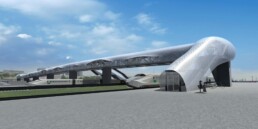
The Pickering GO Pedestrian Bridge recently received a record from the Guinness World Records for the longest enclosed pedestrian bridge in the world. Located in the City of Pickering, 32 km east of downtown Toronto, the 250-meter bridge makes its way across 14 lanes of Highway 401, six live rail tracks and a two-lane municipal roadway. Completed in 2018, the bridge features an iconic architectural structure that is highlighted with around 300 LED lights at night.
To accommodate the pedestrian traffic and connect Pickering station to the region’s largest shopping mall and local college, a bridge project was undertaken by multiple levels of government and the provincial rail agency in 2011. The project experienced multiple project phases throughout the years of construction over the busiest highway in North America.
An unparalleled innovation in architectural design and materials
The pedestrian bridge is the first of its kind in terms of architectural design: a standard truss-based steel structure with concrete flooring and a membrane-on-steel-deck roof, the bridge’s interior has customized glazing that provides a comfortable interior environment. It is also the first bridge to be covered in a highly specialized perforated aluminum sheeting (cladding) called Kalzip.
The Kalzip material allows light penetration and ensures visibility from both inside and outside of the bridge. Utilizing a passive ventilation approach, the Kalzip material resists solar gain, easily sheds snow and ice (before accumulating), and reduces wind-loading. Most importantly, the material gives the bridge a progressive look that beautifies the area around it. It is practical and gorgeous all at the same time.
An unprecedented challenge in fitting custom-made structures
The installation of the interior glazing and the Kalzip cladding presented a unique challenge for the engineers and contractors involved. Both the interior glazing and the Kalzip cladding were custom manufactured. The sophisticated structural design of the Kalzip cladding came with an intricate perforation pattern and a unique proprietary connection. Since the Kalzip was cut and form-rolled on-site into compound curves, each individual sheet must be cut extremely accurately to be mounted successfully. To address the challenge, Applied Precision 3D was requested to provide high-accuracy 3D data for the areas where the materials were to be installed.
How LiDAR 3D scanning ensures better fit for installation
Having reviewed the tight dimensional requirements and sophisticated design, and made reconnaissance visits to the site, the Applied Precision 3D team decided to implement LiDAR 3D scanning to produce "as-built" data for the installation.
The LiDAR 3D scanning of the glazing openings and the Kalzip cladding produces digital templates that can be used to adjust drawings and ensure a better fit. If there were discrepancies, then the contractor was able to make adjustments, thereby minimizing scrap from test-fitting and installation. Additionally, survey targets were installed throughout the scan scenes to help alignment from scans and achieve the required 3D measurement accuracy.
Once the data was collected through LiDAR 3D scanning, the team post-processed it and ran an auto-alignment software tool to generate a uniform point cloud. Through the reverse engineering CAD software, the point cloud was transformed into a model of construction elements of interest requested by the contractor. This was the ‘as built’ structure.
Critical 3D measurements in Toronto’s mass transit infrastructure expansion
As an important contributor to Toronto's expanding transit infrastructure, Applied Precision’s 3D measurement and 3D modeling expertise played a key role in the expansion of the TTC Yonge-University Line 1 to Vaughan. These involved much more complex and progressive designs, fabrication challenges, and site construction difficulties that the TTC had not faced in the past.
To install custom glass and Kalzip on the roof curves of the TTC stations, most notably, the Highway 407 station at Jane and Highway 407, the Applied Precision 3D team used advanced LiDAR 3D scanning in conjunction with 3D laser trackers to collect critical measurements needed to verify the unique architecture. 3D modeling of the ‘as-built’ conditions was completed at various stages. Using advanced 3D technology and 3D inspection software, the Applied Precision team checked and modeled the complex structures of each station to ensure installation fitment. This involved the core steel structures, concrete structures and features for the installation of custom glass and Kalzip material on the roof.
Our Team of 3D metrology and construction inspection experts here at Applied Precision 3D has been called upon many times over the years to help solve difficult and complex 3D construction problems, commented Robert Bell, Founder and President of Applied Precision 3D.
I am proud of the dedication and problem solving expertise that was applied by our Team to each challenge from Toronto’s iconic Union Station, Eglinton Station, the new Vaughan Metropolitan Centre Subway station to the new Guinness record holder; the Pickering GO Bridge.
We certainly look forward to supporting the on-going development of the Greater Toronto Area’s transit infrastructure in the coming years, added Bell.
Benefits From Use of LiDAR in BIM Methods
Without 3D scanning there would be no other cost-effective method to get the Kalzip to accurately fit on the first go. Test-fitting without the ‘as built’ CAD model, referred as “trial and error” approach, would typically lead to a high scrap rate and project delays.
Large scale 3D scanning offers the capability to capture ‘as built’ information, at a cheaper cost than test-fitting on site as adjustments to the drawing on site and achieve proper installation the first time. Buildings of various types of materials can be digitized through LiDAR 3D scanning to provide comprehensive 3D data to architects, engineers, and construction workers.
Applied Precision 3D has more than 20 years of experience applying high-precision optical 3D metrology principles to many challenges including institutional and commercial buildings. Our expertise, combined with today’s advanced 3D laser digitizing technology, offers speed, accuracy, and reliability to meet demanding architectural design and construction challenges in mass transit, custom glass installations, piping layouts, plant layouts, historical buildings and heritage sites and new build construction.
Get a quote for your project today.
Source: LiDAR Magazine
RealWear Navigator 500 VS. The RealWear HMT-1 – Which is Better?
RealWear, the leading provider of assisted reality solutions for frontline industrial workers, unveiled the next-generation industrial-strength wearable, the RealWear Navigator 500. The navigator 500 is built on the success of the RealWear HMT-1, with a few noticeable hardware and design upgrades. So what are the highlights and features compared to the HMT-1 and should you upgrade to the Navigator 500?
Highlights of the Navigator 500
The RealWear Navigator 500 features a revolutionary modular design
The RealWear Navigator 500 features a patented modular design that enables customers to swap out specific modules such as the camera, modem, battery, and others in the future. This increases the agility in many user scenarios while reducing long-term capital investment.
Hot-swappable battery with better battery life
Compared to the internal battery cell of the HMT-1, which requires the device to be powered down prior to removal, the RealWear Navigator 500 has an external battery pack that can be quickly hot swapped to another battery without needing to power down the device.
The increased battery life of the Navigator 500 represents a major breakthrough. With an expected battery life of up to 8 hours, frontline workers can rely on the Navigator for an entire shift without any charging during a typical shift.
The RealWear Navigator 500 has better camera and display
Camera: As the key component of the wearable device, better cameras allow workers to capture pictures with more details. The camera on the Navigator 500 gets a boost from the HMT-1's 16-megapixel camera. The Navigator 500 features a 48 Megapixel camera from Sony, which is comparable to professional cameras. The 48MP camera from Sony, with enhanced zoom and excellent lowlight performance, allows for quick scanning of barcodes and QR codes, easily capturing serial numbers, asset tags, wiring diagrams, pinouts, etc. in sharp detail, and capturing images for reference. The camera module can be easily swapped out with other accessory options, such as thermal or inspection cameras.
Video: The video recording resolution is unchanged at 1080p. However, frame rates on the Navigator 500 have increased to 60 frames per second from 30 on the HMT-1. Users are able to capture smoother videos when moving at a high speed.
Display: The RealWear Navigator 500 features a vibrant display that works great indoors as well as in direct sunlight. With the modular design, the display can be swapped for future hardware upgrades.
Upgraded performance
A brief overview of the specs of the RealWear Navigator 500 compared to the HMT-1:
| Product | RealWear Navigator 500 | RealWear HMT-1 |
| Processor | Qualcomm Snapdragon 662 | Qualcomm Snapdragon 626 Pro |
| Memory | 4 GB RAM | 3GB RAM |
| Storage | 64 GB Flash | 32 GB Flash |
| Camera | Sony 48MP | Samsung 16MP |
| Video | 1080p 60fps | 1080p 30fps |
| Weight | 272g | 385g |
| Width | 22 mm | 33 mm |
| Noise Cancellation | 100 dBA | 95 dBA |
Should you upgrade to the Navigator 500?
There's no easy answer that applies to every company since purchase decisions will always vary depending on your business technology strategy and budget.
The Navigator 500 will certainly pay off the upgrade cost with its improved performance and prolonged capability for a long shift. Across different industries such as manufacturing, automotive, aerospace, food processing, education, and others, the Navigator 500 accelerates companies' adoption of a new way to work in a post-pandemic world.
Your organization will see an immediate boost in work quality and efficiency from the better hardware in the Navigator 500. And the Navigator 500 will hold value with the future upgrades of core components from the modular design.
Meanwhile, the HMT-1 will be less costly to obtain after the launch of the new model. HMT-1 will continue to hold its core value and receive major updates in the future. Compared to Navigator 500, HMT-1 is a more cost-effective application at the moment.
Learn More About the RealWear Navigator 500
Contact Us for More Information
Fill out the adjacent form and a member of the Applied Precision 3D team will reach out to you to provide more information on RealWear's Navigator 500, HMT-1, or any of our other augmented reality products and services.
Contact Us
Informed Re-Shoring Decisions with 3D Precision and Know-How
As North American manufacturers navigating through the impacts of the pandemic, we have experienced and developed a heightened appreciation for the fragility and vulnerability of many of our global supply chains. ‘Re-shoring’ has become a topic of much thought and debate among industry leaders. To what extent will the economy be less global? Will we see a return to more regional economies?
Critical decisions in 3D
The decision to ‘re-shore’ (or not) your primary production or component supplies is both a strategic and complex one with immediate and long-term implications. Having worked extensively with OEMs, Tier 1, 2 and 3 suppliers across a variety of industries for over two decades, we understand the critical importance of accurate, reliable component and final product information to ensure designs, manufacturing processes and on-going quality assurance is never compromised.
Do we have the 3D information to successfully re-short production or component supplies? Do we have current part, assembly and tooling data?
As your Team works through these decisions, you can rely upon our Team for critical 3D information to help guide those decisions and minimize risk.
1. Reverse engineering of components, assemblies and tooling when only incomplete or questionable CAD information is available.
2. Precise and comprehensive 3D metrology support including independent QA to validate part and tooling geometry when quick and solid production decisions are needed.
3. Reliable, precise 'as built' 3D data for FEA, CFD and other required simulations.
4. LiDAR 3D scanning and modeling - plant and equipment layouts.
5. Enabling tools for better communication and digital information access - hands-free computing for industry.
6. Digital transformation support - deep skills and abilities for digitizing your products, your processes and your manufacturing facilities.
7. Technology solutions for better North American workforce training, remote technical support and expert knowledge capture.
Informed decisions – industry resources are available
A recently launched initiative, Reshoring Canada, is promoting and assisting in the sensible reshoring of Canadian business operations. Those in the automotive, tool & die industries and resource sectors such as mining and energy are particularly susceptible to supply chain disruptions, so many are in the early stages of evaluating or planning to re-shore large parts of their operations. The right combination of 3D digital transformation technologies and expertise can help reduce design and launch costs and shorten tooling and production start-up times for those committing to reshoring.
Applied Precision 3D’s Team and engineering grade technology solutions can quickly establish precise CAD reference models to meet the most demanding part design and tooling tolerances. This technology can be applied from small to large parts and all types of tooling; from intricate electronic connectors to seating systems, to welded assemblies, to full body in white! Quickly acquire highly detailed 3D data on all components of a vehicle so you can move faster and benefit fully from re-shoring opportunity.
How 3D technology and expertise helped the Canadian Historical Aircraft Association's "Wooden Wonder" restoration
A team in Windsor, Ontario is restoring a rare WW2 bomber—with a little help from the experts at Applied Precision 3D
Part by part, for more than 20 years, a group of volunteers at Windsor’s Canadian Historical Aircraft Association have been meticulously rebuilding a deHavilland twin-seat DH.98 Mosquito, whose blueprints were lost many years ago. The 'Wooden Wonder', as it was called, is one of the most famous and successful WW2 Allied Forces combat aircraft. In fact, Mosquito squadrons in January 1943 were the first to discredit the Germans’ claim that no enemy plane could fly over Berlin unscathed. The bomber was incredibly fast, maneuverable, versatile—and it was made almost entirely out of wood. Unfortunately, as a result of its construction, there are only some 30 Mosquitos in the world today and merely three of those are airworthy.
“Whether it is a restoration or a new build, parts for the Mosquito are very difficult to find,” said John Robinson, President of the association, based in Windsor. “One of the major parts we needed was the landing gear nacelle. There are no drawings for this and the job of trying to replicate it is very difficult without drawings.”
The group, however, did have an original part for the nacelle, a 12-foot long streamlined housing for the landing gear that is attached to the underside of the wing. The nacelle part was missing ribs and other key components.
“That’s basically when Applied Precision 3D came to the rescue for us,” said Robinson. “They were able to scan the whole unit for us and put it into a form that we could pull to CAD and accurately build the ribs and parts.”
Although modern 3D technologies and reverse engineering are helping the restoration project overcome some of its most difficult challenges, Robinson estimates it will still take the volunteers another decade or so to complete the complete Mosquito restoration. “This is work from the heart,” he said.
In the meantime, the Wooden Wonder restoration project is on display at the Association’s museum at the Windsor, Ontario airport. You can watch the video below that features a similar aircraft:
3D Scanning – The Best Method for Part and Assembly Inspection
Traditionally, companies use a coordinate measuring machine (CMM) to inspect a part’s basic geometry features. While that’s a good option when there are limited features to measure, it can get complicated when working with complex parts that have unique features.
3D scanning parts takes inspection to a new level. This technique is almost always faster and better suited for complex components and assemblies where more surface geometry measurement is needed.
3D scanners fill the gaps that other measurement technologies cannot when it comes to complex part geometry and assemblies with dozens of parts. Experts know that when it comes to inspection, precision and accuracy is of the utmost importance.
Why Use 3D Scanning for Part and Assembly Inspection?
Measurement with a 3D scanner is proven to be more precise than other measurement technologies. This is because when used in proper conditions, 3D scanners remove many human elements from the measurement process, significantly reducing the risk of error. The reduced risk of human error increases the repeatability of taking highly precise and accurate measurements.
Companies that have switched to 3D scanning can attest that the level of accuracy received from scan data is for more than they could have imagined. With a wide range of 3D scanners measuring down to a sub-thousandth of an inch (some with an accuracy of 0.0009 in (0.025mm)) – you can be assured that there is a 3D scanner that can capture the level of accuracy that you’re looking for.
Accuracy, traceability to an appropriate metrology standard and repeatability of results are all important factors to keep in mind to ensure reliable results. Operator skill and experience is critical to achieving this.
How 3D Scan Data is Used for Part and Assembly Inspection
After scanning, the point cloud data collected can be processed into a digital model. This process allows for the features in the scanned data set to be identified so that reliable and accurate measurements can be taken.
3D scanning enables experts to collect data for targeted areas of a part, but perhaps more useful, these experts can collect data for an entire part. Collecting data for an entire part allows for much more than simple dimensions of key features; it can give an analysis of the manufactured part in comparison to original CAD.
3D Scan Data Deviation from Original CAD
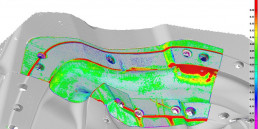
Data of an entire part can be used to generate deviation maps that help inspect dimensions. Deviation maps are often very useful for answering questions that simple dimensions may bring up. In addition to deviation colour-maps, additional analyses, such as 2D and 3D cross-sections, boundary and edge comparison can be completed.
Furthermore, when a company provides their part’s CAD data and the corresponding geometric dimensioning and tolerancing (GD&T), experts can use advanced software to perform a GD&T alignment and inspection. This is particularly useful when showcasing a pass-fail geometry in combination with other inspection methods.